
Key takeaways
- Finds structure faster. You can search a shoreline, flat, or reservoir point without paddling directly over every likely target.
- Shows cover’s shape and position. Side imaging can distinguish a brush pile, rock cluster, creek channel, or submerged boat more clearly than a basic sonar arch.
- Improves kayak efficiency. Because kayak anglers cover water more slowly than motorboat anglers, seeing farther to the sides can reduce unproductive paddling.
- Helps you return to targets. GPS waypoints let you mark structure, bait concentrations, and productive turns for later passes.
- Works well for mapping unfamiliar water. The combination of sonar and chart data can reveal breaks and cover that are not obvious from shore.
- Pairs well with precise presentations. Once you see a target, you can approach it from the upwind side and position your kayak for casting, vertical presentations, or controlled drifts.
- Provides information beyond fish location. Even when fish are not visible, bottom composition, shadows, and cover can tell you where to spend time.
The Short Answer
Yes—side imaging is worth it for kayak fishing if you regularly fish unfamiliar water, cover large areas, or target structure beyond the narrow path directly beneath your kayak. If you mostly fish small, familiar ponds, shallow rivers, or tight vegetation, a basic down-imaging or traditional sonar unit is usually the better value.
Side imaging is not a magic fish detector. It is a scouting tool that helps you see laydowns, rock piles, weed edges, drop-offs, channels, and bait activity to either side of your kayak. Its value depends less on the feature itself than on whether you have enough time, battery capacity, mounting space, and confidence to use the information.
Our top picks

As an Amazon Associate we earn from qualifying purchases at no extra cost to you.
What You Actually Get
A side-imaging fish finder sends sonar beams outward from the transducer and displays the returns as a picture-like view of the bottom on both sides of your kayak. Depending on the unit and settings, you may see 60 to 125 feet per side, although maximum range is not always the clearest or most useful range.
The practical advantage is coverage. A kayak typically moves at about 2 to 4 mph while searching, so side imaging can scan a broad swath without requiring you to paddle directly over every piece of cover. A submerged tree that is 30 feet to your right may never appear on a narrow down-imaging cone, but side imaging can reveal it, show its shadow, and help you turn around and fish it precisely.
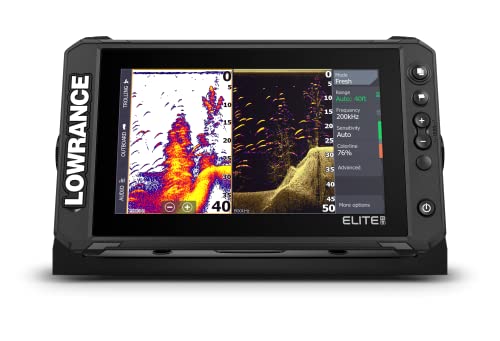
Most modern units combine side imaging with traditional 2D sonar, down imaging, GPS mapping, and temperature readings. The Humminbird Helix 7 G4 GPS Fish Finder with MEGA Side Imaging is a 7-inch-class option listed at $649.98. The Lowrance Elite FS 9 uses a larger 9-inch display and includes an Active Imaging 3-in-1 transducer and preloaded C-MAP Contour+ charts; current pricing varies by retailer and package.
A 7-inch screen is often easier to fit on a compact kayak, while a 9-inch screen gives you more room to interpret split views, charts, and side-imaging detail. Plan for roughly 7 to 10 inches of display width, a transducer mount, wiring, and a 12-volt battery. Many kayak anglers use a 7- to 12-amp-hour battery for a day trip, but actual runtime depends on screen brightness, sonar settings, temperature, and the unit’s power draw. Confirm the manufacturer’s amperage specification before choosing a battery.
Installation matters as much as the display. A transducer mounted inside the hull may work for some sonar modes, but side imaging generally performs best when the transducer has a clear view to both sides. A side-scan-ready scupper, stern, arm, or removable pod mount is often preferable. The transducer should sit low enough to avoid interference from the hull, rudder, pedal drive, or mounting arm.
Pros
- Finds structure faster. You can search a shoreline, flat, or reservoir point without paddling directly over every likely target.
- Shows cover’s shape and position. Side imaging can distinguish a brush pile, rock cluster, creek channel, or submerged boat more clearly than a basic sonar arch.
- Improves kayak efficiency. Because kayak anglers cover water more slowly than motorboat anglers, seeing farther to the sides can reduce unproductive paddling.
- Helps you return to targets. GPS waypoints let you mark structure, bait concentrations, and productive turns for later passes.
- Works well for mapping unfamiliar water. The combination of sonar and chart data can reveal breaks and cover that are not obvious from shore.
- Pairs well with precise presentations. Once you see a target, you can approach it from the upwind side and position your kayak for casting, vertical presentations, or controlled drifts.
- Provides information beyond fish location. Even when fish are not visible, bottom composition, shadows, and cover can tell you where to spend time.
Cons
- It costs more. A useful side-imaging setup commonly starts around $500 and can exceed $1,000 once the display, transducer, mount, battery, case, and wiring are included.
- It consumes space and power. A 7- or 9-inch unit can compete with rod holders, tackle, and a fish finder mount. A full day may require a dedicated rechargeable 12-volt battery rather than a small USB power bank.
- Installation can be awkward. Pedal drives, rudders, scuppers, and rocky launches create mounting challenges. A poorly positioned transducer can produce blocked or distorted images.
- The screen can be hard to read. Glare, spray, polarized sunglasses, and direct sunlight make a larger, brighter display valuable—but also increase cost and power use.
- Interpretation takes practice. Side-imaging images are not photographs. Shadows, boat speed, range settings, water depth, and bottom hardness affect what you see.
- It does not always show fish clearly. Small fish, suspended fish, and fish close to cover may be difficult to separate from clutter. Traditional sonar remains important for confirming what is beneath you.
- Maximum range is situational. In deep water, rough conditions, or areas with a soft bottom, the far edges of the display may be less detailed than the center.
Who Should Buy It
Buy side imaging if you fish larger lakes, reservoirs, tidal water, or unfamiliar rivers and spend meaningful time searching. It is especially useful for anglers who target bass, walleye, crappie, and other species associated with visible or submerged structure.
It also makes sense if you fish from a pedal kayak or a stable sit-on-top platform with room for a 7- or 9-inch display. Pedal drive gives you better control while scanning and makes it easier to circle a waypoint after finding something interesting. Anglers who routinely fish several bodies of water will get more value from GPS, mapping, and side imaging than someone who visits one small pond.
Choose the Humminbird Helix 7 if compact size and a known $649.98 package price fit your budget. Consider the Lowrance Elite FS 9 if you value a larger screen, detailed chart integration, and a broader view while interpreting side-imaging returns. Compare the complete package, not just the display: transducer type, charts, mounting method, battery, and warranty can change the real cost.
Who Should Skip It
Skip side imaging if you mainly fish water under 10 feet deep, narrow streams, tiny ponds, or thick vegetation where the transducer’s view is blocked. It is also a poor first upgrade if you do not yet have a reliable paddle, PFD, rod storage, anchor or drift-control system, and battery plan.
Bank anglers, occasional kayak users, and people who fish familiar spots may learn more from a basic GPS sonar unit costing a few hundred dollars less. If you rarely move while fishing, side imaging’s biggest advantage—covering water during a search—also becomes less important.
Cheaper Alternatives
| Option | Cost | Trade-off |
|---|---|---|
| Basic traditional sonar fish finder | $100–$250 | Lowest cost and power use, but shows a narrower view and less detail around structure. |
| GPS unit with down imaging | $250–$500 | Better view directly below the kayak and useful mapping, but it will not scan cover to both sides. |
| Used 7-inch side-imaging unit | $300–$550 | Can deliver excellent value, but battery condition, software support, transducer compatibility, and screen damage require careful inspection. |
| Portable sonar or castable fish finder | $150–$400 | Simple to transport and install, but usually offers less screen space, shorter battery life, and weaker mapping capabilities. |
FAQ
Does side imaging work from a kayak?
Yes, provided the transducer has a clear view to both sides and the kayak moves steadily. Keep the transducer away from hull edges, rudders, pedal drives, and turbulence. A rigid mount that can be raised during launches is a practical choice for shallow or rocky water.
How fast should I paddle while using side imaging?
A steady 2 to 4 mph is a useful starting range for searching. Slower movement can provide more detail, while faster movement covers more water but may make targets harder to interpret. Adjust the range so the target area occupies a useful portion of the screen rather than relying on the farthest available setting.
Is a 7-inch or 9-inch screen better for kayak fishing?
A 7-inch screen is easier to mount and usually places less demand on space and power. A 9-inch display is easier to read and better for viewing side imaging beside a chart or traditional sonar panel. Choose the largest screen your kayak can support without interfering with paddling, casting, or safe movement.
Is side imaging better than down imaging?
Neither is universally better. Side imaging is better for finding structure away from your path; down imaging is better for examining what is directly below the kayak. The most versatile setup includes both, plus traditional sonar for depth, temperature, and fish confirmation.


Write Your Review
No reviews yet. Be the first to share your experience!