
Our Top Picks
 Philips Wi-Fi Smart Deadbolt Lock2 inches x 6 inches x 1.5 inches6 x 2 x 1.5 inches1.4 PoundsCheck on Amazon
The eufy Security Smart Lock C220 is the best smart lock with a fingerprint reader for most front doors in 2026: it pairs a fast capacitive sensor with a backlit keypad, app control and a battery-first design that works without a hub or subscription. If the budget matters more than the polish, the Veise VE017 delivers fingerprint, keypad and app entry for roughly half the outlay and is the pick for most rental-grade front doors. If you would rather not touch anything at all, the Wyze Palm Lock replaces the fingerprint reader with palm vein recognition and unlocks on a wave of your hand while you are carrying groceries. The rest of this roundup fills in the gaps: the Philips Wi-Fi Smart Deadbolt is the one to buy when you need to manage entry remotely, the Sifely handle lock suits doors where you want a lever rather than a deadbolt, and the KLLOQUE and Yamiry knob-style locks cover interior and secondary doors at budget prices. Below, every option is compared on fingerprint response, access-code and key backup, connectivity, door compatibility, battery life and installation requirements.
Top 3 Picks
Best overall: eufy Security Smart Lock C220
The C220 is the most balanced fingerprint deadbolt in this group. It reads a print in the same fraction-of-a-second class as premium competitors, keeps a keypad and app as fallbacks for when a finger is wet or cut, and runs on common alkaline cells rather than a proprietary rechargeable pack. It suits a main front door on a standard cylindrical prep where you want one lock that does everything competently and nothing badly.
Best budget: Veise VE017
The VE017 covers the three entry methods that matter — fingerprint, keypad, app — in a satin nickel deadbolt that installs on the same holes as the lock it replaces. Response is a touch slower and the app is plainer than the premium tier, but at a budget price it is the least risky way to find out whether fingerprint entry fits your household. It is the pick for a first smart lock or a secondary entry door.
Best for hands-full entry: Wyze Palm Lock
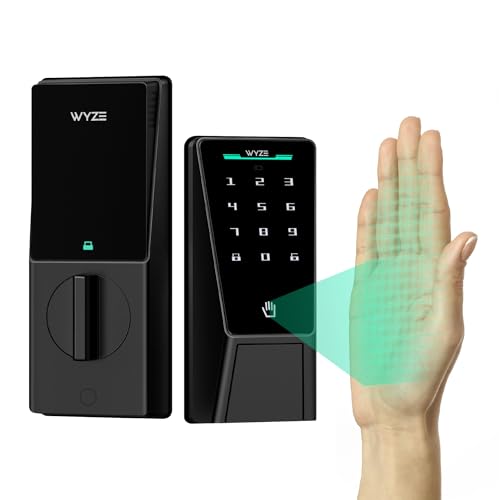
The Palm Lock swaps the fingerprint sensor for palm vein recognition, which reads through the palm of your hand at a short distance rather than requiring a fingertip press. That makes it the best choice for households where people arrive loaded with bags, children or tools, and for anyone whose fingerprints are worn, dry or hard to enroll. It is premium-tier, and worth it specifically for the no-contact entry.
Quick Comparison
Every product below uses the same six decision criteria. “Battery class” describes the cell type and the life range typical for that class rather than a promise from one test bench, because Wi-Fi polling, cold weather and how often the motor runs all move the number.
| Product | Best for | Format | Entry methods | Connectivity | Battery class | Door fit | Price tier |
|---|---|---|---|---|---|---|---|
| Veise VE017 | Budget front door | Single-cylinder deadbolt, satin nickel | Fingerprint, keypad, app | Bluetooth + app; bridge needed for remote on most SKUs | 4-cell AA alkaline, roughly 6-12 months | 1-3/8 in to 2 in doors; 2-3/8 in or 2-3/4 in backset | Budget |
| eufy Security Smart Lock C220 | Most front doors | Single-cylinder deadbolt | Fingerprint, keypad, app | Bluetooth-first; remote access depends on bridge or hub | 4-cell AA alkaline, up to about 12 months claimed | 1-3/8 in to 2 in doors; 2-3/8 in or 2-3/4 in backset | Premium |
| Philips Wi-Fi Smart Deadbolt | Remote access and guest codes | Single-cylinder deadbolt | Fingerprint, keypad, app | Wi-Fi built in, no bridge required | 4-cell AA alkaline, roughly 6-12 months (Wi-Fi draws more) | Standard 2-1/8 in cross bore, 1 in edge bore | Mid-range |
| Wyze Palm Lock | Hands-full, no-touch entry | Deadbolt with palm vein reader | Palm vein, keypad, app | Wi-Fi and Bluetooth class | AA alkaline class, roughly 6-12 months | Standard residential deadbolt prep | Premium |
| KLLOQUE Fingerprint Door Knob | Interior and secondary doors | Knob replacement, matte black | Fingerprint, keypad, mechanical override | Bluetooth class | AA or AAA alkaline class, roughly 6-12 months | 1-3/8 in to 1-3/4 in doors; knob bore | Budget |
| Sifely Fingerprint Handle Lock | Lever-handle doors | Handle set with keypad | Fingerprint, keypad, app, remote access | Bluetooth plus bridge class for remote | 4-cell AA alkaline, roughly 6-12 months | Standard cylindrical prep, 1-3/8 in to 1-3/4 in | Mid-range |
| Yamiry Fingerprint Knob | A cheap second door | Knob replacement with keypad | Fingerprint, keypad | Bluetooth class | AA or AAA alkaline class, roughly 6-12 months | 1-3/8 in to 1-3/4 in doors; knob bore | Budget |
Price tiers here are relative bands, not fixed figures: budget-tier fingerprint locks generally sit in the low double digits to about $120, mid-range models run roughly $120-$200, and premium models land above that. Tiers move with sales, so treat them as a ranking of what you are paying for rather than a price list.
How We Chose
Selection started with the door, not the feature list. Every product here has to install on a common residential prep — a 2-1/8 in cross bore, a 1 in edge bore and either a 2-3/8 in or 2-3/4 in backset — because a lock that needs a new bore is a different purchase than one that swaps in over twenty minutes. From there we filtered on four things. First, entry redundancy: a fingerprint lock without a workable fallback is a liability in rain, cold or after a minor hand injury, so keypad, keyway or emergency power matters as much as the sensor. Second, sensor class: capacitive readers respond in roughly 0.3-1.0 seconds and tolerate damp skin better than the optical readers still found on some budget hardware. Third, connectivity honesty: we separated models with built-in Wi-Fi from Bluetooth-only models that need a bridge, because “remote access” is the single most commonly misunderstood spec in this category. Fourth, ownership cost and upgrade path — cell type, whether the lock accepts rechargeable cells, and whether the same app grows with you when you add a second door. We compared published manufacturer specifications and category standards; we did not test these locks ourselves and we do not own them.
1. Veise VE017 – Best for Budget Front Doors

Veise VE017 Fingerprint Smart Door Lock with App Control, Satin Nickel
Chosen because it specifies Satin Nickel.
View on AmazonThe VE017 is the lock to buy when you want to know whether fingerprint entry actually suits your household before spending premium money on it. It is a satin nickel deadbolt with a fingerprint reader, a keypad and app control, and it installs on the same holes as the deadbolt you are removing. It suits a first smart lock, a rental where you want to keep the original hardware in a drawer, or a secondary entry door that gets a few dozen openings a week rather than a few dozen a day.
Key specs
- Format: single-cylinder deadbolt, satin nickel finish — the most forgiving finish for a front door because it hides fingerprints and does not chalk in UV the way some matte coatings do.
- Entry methods: fingerprint, backlit keypad, app unlock.
- Sensor class: capacitive fingerprint reader, typical response in the half-second range for this class.
- Template capacity: fingerprint storage in the 50-100 template class, which is about ten users at five fingers each — more than enough for a family plus a cleaner.
- Connectivity: Bluetooth to the app for local management; remote access is a bridge question on most SKUs in this tier, so confirm before buying if you need to unlock from another city.
- Battery: four AA alkaline cells, roughly 6-12 months in this class.
- Door fit: 1-3/8 in to 2 in thick doors, 2-3/8 in or 2-3/4 in backset, standard 2-1/8 in cross bore.
- Installation: retrofit over an existing deadbolt, typically 20-40 minutes with a Phillips screwdriver.
Strengths and trade-offs
The value case is straightforward: you get all three entry methods that matter, in a package that does not require you to learn a new ecosystem or buy a hub. The keypad is the quiet hero here — it is what guests, delivery access and family members who refuse to enroll a fingerprint will actually use, and it keeps working when the reader is confused by a wet or cold finger. For a door that is used by a handful of people rather than a rotating cast, the sensor speed difference between this and a premium lock is measured in fractions of a second, which most people stop noticing after the first week.
The trade-offs are the usual budget-tier ones. App polish and notification detail are thinner, the motor is a little louder on a heavy door with a stiff weather seal, and the finish quality of the internal mechanism will not match a lock designed for a decade of twice-daily use on a main entry. None of that matters on a side door or a garage entry; all of it matters if this is the only lock on a busy family front door.
Pros
- Fingerprint, keypad and app entry at a budget-tier price
- Satin nickel finish hides smudges and resists UV fading
- Retrofits onto existing deadbolt holes with hand tools only
- Common AA alkaline cells — no proprietary pack to replace
- Good template and code capacity for a small household
Cons
- Remote access typically needs a bridge, not built-in Wi-Fi
- Sensor response and app depth trail the premium tier
- Confirm whether your SKU includes a mechanical keyway if a key backup matters to you
- Motor is louder on doors with a tight weather seal
- Not built for high-traffic commercial-level use
How it compares
Against the eufy Security Smart Lock C220, the VE017 gives up sensor refinement, app quality and long-term mechanism durability in exchange for a much lower price. If this lock is going on the door you use forty times a week, the C220 is the better long-term buy. If it is going on a door you use ten times a week, or if you are not yet sure you want fingerprint entry at all, the VE017 is the smarter first purchase and the money you save covers two years of batteries.
2. eufy Security Smart Lock C220 – Best Overall for Most Doors

eufy Security Smart Lock C220, Fingerprint Keyless Entry Door Lock
Chosen because it specifies Fingerprint Keyless Entry Door Lock.
View on AmazonThe C220 is the lock most people should buy. It is a fingerprint deadbolt with a keypad and app control, built by a brand that has been shipping connected home hardware long enough to have the app side sorted, and it targets the middle of the market on price while behaving like the top of it on the sensor. It suits a main front door on a standard cylindrical prep, a household of three to six people, and anyone who wants fingerprint entry that works on the first press in the rain.
Key specs
- Format: single-cylinder deadbolt, retrofit over an existing deadbolt prep.
- Entry methods: fingerprint, backlit keypad, app unlock.
- Sensor class: capacitive reader with the fast-response behaviour typical of the premium tier — the practical difference is fewer failed reads on damp or slightly off-centre fingers.
- Template capacity: fingerprint and user-code storage in the class that comfortably covers a large family, which is the spec that matters if you have teenagers who lose things.
- Connectivity: Bluetooth-first for setup and local control; if you need remote unlocking or real-time notifications away from home, check whether the model you buy includes Wi-Fi or requires a separate bridge.
- Battery: four AA alkaline cells with a claimed life up to roughly twelve months — the long end of this category, and the reason this lock tolerates a busy front door without monthly battery anxiety.
- Door fit: 1-3/8 in to 2 in doors, 2-3/8 in or 2-3/4 in backset, 2-1/8 in cross bore.
- Installation: retrofit install in the 20-40 minute range; no new holes, no chiselling, no wiring.
Strengths and trade-offs
What separates the C220 from budget hardware is consistency. The reader does not need a second press to wake up, the keypad lights reliably in low light, and the app tells you who unlocked and when without making you dig. That last point is more useful than it sounds: in a shared house, the ability to see that the door was opened at 6:40 pm by the keypad rather than by a fingerprint answers most of the “did someone leave the door unlocked” questions before they become arguments.
Battery behaviour is the other quiet win. A twelve-month class life on four AA cells is only possible if the lock sleeps aggressively between events, and aggressive sleeping is exactly what keeps the sensor from draining the cells in cold weather. If you want the arithmetic: four AA alkaline cells at about 2,500 mAh and 1.5 V each hold roughly 15 Wh (4 × 2.5 Ah × 1.5 V). Spread across twelve months that is about 41 mWh a day, an average draw of roughly 1.7 mW. If the same lock drops to four months of life, it is drawing about three times that — usually a sign of constant Wi-Fi polling or a motor straining against a misaligned strike.
The trade-off is that this is a premium-tier price for a Bluetooth-first design. If remote access from anywhere is a hard requirement, the Philips Wi-Fi Smart Deadbolt covers it without a bridge, and you should weigh that against the C220’s better sensor and app.
Pros
- Fast, consistent capacitive fingerprint response
- Up to roughly twelve months of claimed battery life on four AA cells
- Backlit keypad that stays usable in bad weather and bad light
- Mature app with per-user entry history
- Straight retrofit onto standard residential deadbolt prep
Cons
- Premium-tier price for a Bluetooth-first connectivity approach
- Remote access may require a bridge depending on the SKU
- Overkill for an interior or secondary door where the VE017 or a knob lock would do
- Verify keyway and emergency-power arrangements before buying if you have no other way in
How it compares
Against the Veise VE017, the C220 costs substantially more and earns it back on sensor reliability, app quality and mechanism life — worth it on a main door, unnecessary on a side door. Against the Philips Wi-Fi Smart Deadbolt, the C220 wins on fingerprint response and battery life but loses on connectivity, because the Philips has Wi-Fi built in and this one does not. If your front door is used by more than one person per hour, the C220 is the better all-rounder; if it is used by people who are frequently away from home and want to let someone in remotely, the Philips is the one.
3. Philips Wi-Fi Smart Deadbolt – Best for Remote Access
Philips Wi-Fi Smart Deadbolt Lock, Keyless Entry Door Locks for Front Door
Chosen because it specifies Keyless Entry Door Locks for Front Door.
View on AmazonThe Philips Wi-Fi Smart Deadbolt is the pick for anyone whose real requirement is not “fingerprint entry” but “control the front door from somewhere else.” It has Wi-Fi built in, so there is no bridge, no hub and no accessory purchase standing between you and a remote unlock. It suits landlords, households with contractors or dog walkers, anyone who travels, and anyone who has been burned by a Bluetooth-only lock that turned out to need a $50 bridge to do the thing the box implied it did.
Key specs
- Format: single-cylinder deadbolt designed as a keyless front-door lock.
- Entry methods: fingerprint, keypad, app; the listing positions it as keyless entry, so treat a mechanical keyway as something to confirm rather than assume.
- Connectivity: Wi-Fi built in — the defining spec. This is what lets you issue a temporary code to a delivery driver from a hotel and revoke it an hour later.
- Code management: the strength of a Wi-Fi lock is scheduled and one-time codes; look for per-user codes with active date ranges rather than a single shared PIN.
- Battery: four AA alkaline class, roughly 6-12 months, with the honest caveat that Wi-Fi radios draw more than Bluetooth. Expect the shorter end of the range if you check the app often.
- Door fit: standard 2-1/8 in cross bore and 1 in edge bore; verify backset and door thickness against your door before ordering.
- Installation: retrofit in roughly 20-40 minutes; Wi-Fi pairing is the step that eats the extra time.
Strengths and trade-offs
The advantage of built-in Wi-Fi is not just remote unlocking; it is the notification stream. A lock that reports to you in real time tells you when the door opened, which credential opened it and whether it was locked behind them. On a rental property or a house with a cleaner and a dog walker, that log is the feature you are actually paying for, and it is the reason this lock belongs in the roundup even though its fingerprint sensor is not the fastest here.
The cost of that connectivity shows up in battery life and in setup complexity. A Wi-Fi radio that polls a network is the single biggest drain in a battery-powered lock, which is why the honest expectation for this class is closer to six to nine months than twelve. If you are replacing cells more often than that, the fix is usually to reduce how frequently the app pushes status rather than to change the lock.
Fingerprint performance is good but not class-leading. The reader handles a clean, dry finger reliably; if your hands are frequently wet from work, the keypad is the faster path and the palm-based Wyze Palm Lock is the better design for your situation.
Pros
- Wi-Fi built in — remote unlock and real-time status without a bridge
- Well suited to scheduled and temporary codes for guests and trades
- Entry history that is genuinely useful in a shared or rented property
- Retrofits standard residential deadbolt prep
- Brand with broad smart-home compatibility experience
Cons
- Wi-Fi drains batteries faster than Bluetooth-only designs
- Fingerprint response trails the eufy C220
- Keyless positioning means you should verify emergency access before committing
- Mid-range price for a lock that is not the best pure fingerprint reader in this list
How it compares
Against the eufy Security Smart Lock C220, the Philips trades sensor speed and battery longevity for connectivity you do not have to buy separately. That is the right trade if you travel, manage a rental or hand out temporary access regularly. Against the Wyze Palm Lock, it is a different proposition entirely: the Palm Lock solves the “my hands are full” problem, while the Philips solves the “I am not there” problem. If both apply, the Philips covers more ground for the money.
4. Wyze Palm Lock – Best for Hands-Full Entry
Wyze Palm Lock, Smart Door Lock with Palm Vein Recognition, Keyless Entry Smart Locks for Front Door, Keypad, Auto Lock, Dual Battery, Wi-Fi, Works with Alexa & Google, BHMA, IP53, Mechanical Key
Chosen because it specifies Smart Door Lock with Palm Vein Recognition and Keyless Entry Smart Locks for Front Door.
View on AmazonThe Wyze Palm Lock is the most interesting lock in this roundup because it does not use a fingerprint reader at all. It uses palm vein recognition: you hold your open hand near the sensor and the lock reads the vein pattern under the skin, which sits below the surface and is therefore unaffected by calluses, dry skin, minor cuts, water or the thin layer of flour that ruins a fingerprint read. It suits anyone who arrives home carrying things, parents with small children, people whose fingerprints are worn from manual work, and anyone who has quietly given up on fingerprint sensors because theirs never enroll.
Key specs
- Format: deadbolt with a palm vein reader plus a keypad for fallback entry.
- Entry methods: palm vein, keypad, app.
- Biometric class: palm vein, a contact-light recognition method — the practical difference is that nothing has to touch the sensor, so there is no smudged glass to clean and no oily residue building up on the reader.
- Connectivity: Wi-Fi and Bluetooth class, so remote management and notifications come without an extra bridge.
- Battery: AA alkaline class, roughly 6-12 months, with Wi-Fi behaviour putting you nearer the middle of that range.
- Door fit: standard residential deadbolt prep; verify backset and thickness before ordering.
- Installation: retrofit install on existing holes, roughly 20-40 minutes plus app pairing.
Strengths and trade-offs
The case for palm vein recognition is behavioural, not technical. Fingerprint readers are excellent when your finger is clean, dry and positioned flat on the sensor; they are frustrating when it is raining, when you are wearing gloves and pull one off in a hurry, or when you have been handling something that leaves residue. Palm recognition removes the contact step entirely. In a household where two people have given up on the fingerprint sensor and reverted to the keypad, that difference is the whole product.
The second advantage is hygiene and maintenance. A contact sensor accumulates skin oil, and that layer is exactly what degrades read performance over time — which is why the standard advice for any fingerprint lock is to wipe the sensor with a dry microfibre cloth every few weeks. A non-contact reader has no equivalent wear surface, so the maintenance schedule is shorter and the sensor does not slowly get worse.
The trade-offs are price and familiarity. This is premium-tier hardware, and it costs more than the eufy C220 despite not offering a fingerprint reader. Palm recognition also has a learning curve: everyone in the house has to be enrolled, and people instinctively reach for the sensor with a fingertip at first. Give it a week and the habit forms.
Pros
- Reads through the palm — no contact, so wet, dry or worn hands are not a problem
- No sensor glass to smudge, clean or wear out
- Wi-Fi class connectivity for remote management without a bridge
- Keypad fallback for guests and for anyone not enrolled
- Best fit for households where fingerprint sensors have already failed
Cons
- Premium-tier price without a fingerprint reader
- Enrollment is a new habit for everyone in the house
- Not the right choice if you specifically want a familiar fingerprint press
- Verify keyway and emergency access before relying on it as your only front-door lock
How it compares
Against the eufy Security Smart Lock C220, the Palm Lock is the more specialised tool: it costs more and does not read fingerprints, but it solves a problem the C220 cannot. If your household has no trouble with fingerprint readers, the C220 is the better value. If even one regular user has trouble, the Palm Lock pays for itself in avoided keypad frustration. Against the Philips Wi-Fi Smart Deadbolt, the Palm Lock matches on connectivity and wins on entry method for hands-full arrivals, while the Philips remains the stronger pick for remote guest management.
5. KLLOQUE Fingerprint Door Knob – Best for Interior and Secondary Doors

Fingerprint Door Lock, Smart Fingerprint Door Knob with Lock, Matte Black
Chosen because it specifies Smart Fingerprint Door Knob with Lock and Matte Black.
View on AmazonThe KLLOQUE knob is a different product category from everything above: it is a knob-style lock, not a deadbolt, which means it replaces the handle rather than the deadbolt on your door. It suits interior doors — a home office, a workshop, a bedroom, a storage room — and secondary exterior doors where a knob plus a keypad is enough. It comes in matte black, which looks excellent on an interior door and needs more care outdoors.
Key specs
- Format: fingerprint door knob with keypad, matte black finish.
- Entry methods: fingerprint, keypad, plus a mechanical override — the standard fallback on knob-style locks, and worth confirming in the manual before you rely on it.
- Sensor class: capacitive reader typical of the budget tier; response is in the half-second to one-second range.
- Connectivity: Bluetooth class for app management; not a lock you buy for remote access.
- Battery: AA or AAA alkaline class, roughly 6-12 months depending on traffic.
- Door fit: 1-3/8 in to 1-3/4 in doors with an existing knob bore; check backset before ordering, since knob locks are less forgiving than deadbolts about backset variation.
- Installation: replaces the existing knob; typically 15-30 minutes with a Phillips screwdriver.
Strengths and trade-offs
The point of a knob lock is convenience in low-stakes places. On an interior door, a fingerprint knob means no keys rattling in a pocket and no code to remember for the room you use twice a week. The matte black finish is the aesthetic draw, and it works best indoors where UV exposure is limited; matte coatings on exterior doors fade and chalk faster than satin nickel or PVD finishes, which is a real consideration if the door faces afternoon sun.
The structural limitation is the format itself. A knob lock’s security comes from the latch in the door edge, not from a deadbolt in the frame, so it is not the lock to rely on as the only protection on an exterior entry. If you are securing a front door, use a deadbolt and treat a knob lock as a secondary device at most. On an interior door, that limitation is irrelevant and the price advantage is real.
Installation is the easiest in this roundup because you are swapping like for like. The one gotcha is door thickness: knob locks are engineered around a narrower thickness band than deadbolts, and a thick exterior door may be out of range.
Pros
- Lowest-cost way to add fingerprint entry to a door
- Simple like-for-like swap over an existing knob bore
- Matte black finish suits interior doors well
- Fingerprint plus keypad plus mechanical override
- No hub or bridge required for basic use
Cons
- Knob format offers far less security than a deadbolt
- Matte black finish fades faster under direct sun
- Narrower door thickness range than deadbolt models
- Budget-tier sensor response and app features
How it compares
Against the Yamiry knob, the KLLOQUE is the more design-forward choice — matte black, a cleaner knob profile — while the two sit in the same budget band and the same functional class. If you want a lever rather than a knob on an interior door, the Sifely handle lock is the step up, though it costs more and is a bigger install. If the door in question is your front door, skip all three and buy the eufy C220 instead.
6. Sifely Fingerprint Handle Lock – Best for Lever-Handle Doors

Fingerprint Smart Door Lock with Handle & Keypad – No More Lost Keys, Keyless Entry & Remote Access for Home, Kids, Airbnb & Rental Property, DIY Install, Alexa & Google Compatible
Chosen because it specifies No More Lost Keys and Keyless Entry & Remote Access for Home.
View on AmazonThe Sifely handle lock covers a gap the deadbolts cannot: doors that need a lever handle rather than a knob, and doors where you want the whole entry controlled from one unit. It combines a fingerprint reader, a keypad and app control with remote access in a handle-set format, and its positioning — no more lost keys — is aimed squarely at households that are tired of cutting new keys every time someone moves out.
Key specs
- Format: handle set with integrated keypad and fingerprint reader.
- Entry methods: fingerprint, keypad, app, with remote access in the feature set.
- Sensor class: capacitive reader, mid-range response — reliable on a clean finger, keypad is the fallback in bad weather.
- Connectivity: Bluetooth for local control plus bridge class for remote management; confirm what is included before buying if remote access is essential.
- Battery: four AA alkaline class, roughly 6-12 months.
- Door fit: standard cylindrical prep on 1-3/8 in to 1-3/4 in doors; because it is a handle set, alignment of the latch and strike matters more than on a deadbolt.
- Installation: moderate — 30-60 minutes, and you should expect to adjust the strike plate to get a clean close.
Strengths and trade-offs
Lever handles are the accessibility choice. If anyone in the house has grip strength issues, or if you are thinking about how the door will work in ten years, a lever beats a knob every time, and a smart lever with a fingerprint reader beats both. The Sifely also solves a specific frustration: it replaces the keyed handle set entirely, so the whole door is managed from one credential system rather than a smart deadbolt plus an old keyed knob that still needs a key.
Because it is a handle set, installation has more adjustment in it. A deadbolt drops into a single bore and either lines up or does not; a handle set involves the latch, the spindle and the strike, and seasonal door movement shows up as a lever that no longer throws cleanly. Budget an extra fifteen minutes to adjust the strike, and check that the door does not bind in humid weather before you decide the motor is at fault.
Battery life is standard for the class, but a handle-set lock that is used as the only entry point on a busy door will trend toward the shorter end of the range. If you get four months rather than twelve, the arithmetic from earlier applies: the lock is drawing around 5 mW instead of 1.7 mW, which almost always means the motor is working against a misaligned strike.
Pros
- Lever format — easier for children and anyone with grip limitations
- Replaces the whole handle set, so no separate keyed knob remains
- Fingerprint, keypad and app entry with remote access in the feature set
- Good fit for a main entry where a lever is preferred
- Common AA alkaline cells
Cons
- Longer install than a deadbolt, with strike adjustment needed
- Bridge may be required for remote access depending on the bundle
- Handle sets show up door misalignment more than deadbolts do
- Mid-range price for sensor performance that is good rather than best
How it compares
Against the eufy Security Smart Lock C220, the Sifely is the better choice only if you specifically need a lever or want to eliminate a separate keyed knob; on pure fingerprint response and battery life, the C220 is ahead. Against the KLLOQUE knob, the Sifely is a clear step up in security, capacity and app depth, at roughly double the price and with a longer install. If your door already has a lever handle you like, you may be better served by a deadbolt above it than by replacing the handle set.
7. Yamiry Fingerprint Knob – Best for a Low-Cost Second Door

Smart Door Handle Lock with Keypad, Yamiry Fingerprint Knob for Front Door
Chosen because it specifies Yamiry Fingerprint Knob for Front Door.
View on AmazonThe Yamiry knob is the cheapest way in this roundup to put a fingerprint reader on a door. It is a handle-style lock with an integrated keypad, aimed at front doors and interior doors where the goal is simply to stop carrying a key. It suits a back door, a shed, a home office, a basement entry or a rental where you do not want to spend real money on hardware you will leave behind.
Key specs
- Format: fingerprint knob with keypad, handle-style.
- Entry methods: fingerprint and keypad, with a mechanical override typical of the format.
- Sensor class: budget-tier capacitive reader — fine on a clean, dry finger, slower than premium hardware on a difficult one.
- Connectivity: Bluetooth class, app-managed; not a remote-access lock.
- Battery: AA or AAA alkaline class, roughly 6-12 months on a low-traffic door.
- Door fit: 1-3/8 in to 1-3/4 in doors with an existing knob bore; check backset.
- Installation: the quickest in this list — 15-30 minutes, hand tools only.
Strengths and trade-offs
The appeal is purely economic and it is a legitimate appeal. On a shed or a basement door, the alternative is a $15 keyed knob and a key you will lose. For a modest step up you get fingerprint entry, a keypad for the times your finger is dirty, and the ability to delete a credential the moment it should no longer work — which is the one thing a mechanical knob can never do without rekeying. For a rental, that alone justifies the price.
Set expectations on the sensor. Budget-tier capacitive readers work well when your finger is clean and dry and less well in the rain, and the fingerprint that opens the door flawlessly in July may need two presses in January. That is not a defect; it is the physics of a lower-cost sensor and a colder finger. If reliability in bad weather is the priority, budget for the eufy C220 instead.
The knob format carries the same structural caveat as the KLLOQUE: it is not a substitute for a deadbolt on a primary exterior door. Use it on secondary doors and treat it as a convenience layer, not as your main security.
Pros
- Lowest entry price for fingerprint access
- Fast, tool-light installation on an existing knob bore
- Delete and add credentials without rekeying
- Keypad fallback for dirty or wet hands
- Ideal for rentals, sheds, offices and secondary doors
Cons
- Budget sensor struggles with wet or cold fingers
- Knob format provides minimal security compared with a deadbolt
- No meaningful remote access
- App is basic and notifications are limited
How it compares
Against the KLLOQUE knob, the Yamiry is the plainer, more utilitarian option — same format, same budget band, less design emphasis and a slightly more conventional handle shape. Against the Veise VE017, it is not really a competitor: the VE017 is a deadbolt and belongs on a front door, while the Yamiry belongs on the door you would otherwise leave unlocked. Buy the Yamiry for the shed and the





Write Your Review
No reviews yet. Be the first to share your experience!